Is Steemit Down? Explaining the "Down Forever" Server Status Alert
Is Steemit Down Why Server Checkers Say @Steemit.com Is Offline And How to Access It
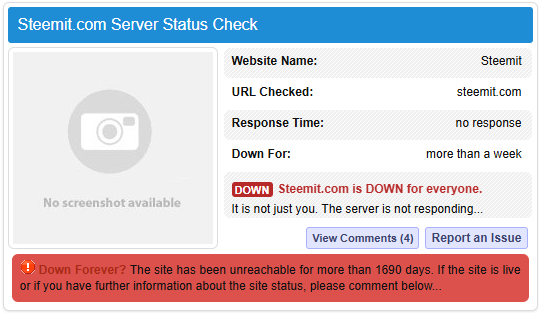
If you recently tried checking whether @Steemit.com is having server issues, you might have been alarmed by what you saw. Popular outage trackers like Is It Down Right Now are currently displaying a bright red warning: "@Steemit.com is DOWN for everyone"—even claiming the site has been unreachable for over 1,690 days.
Before you worry about your account or your #STEEM rewards, take a breath. #Steemit is not actually down. Here is a full breakdown of what is happening behind the scenes and why these status checkers are showing false alarms.
What the Status Reports Show
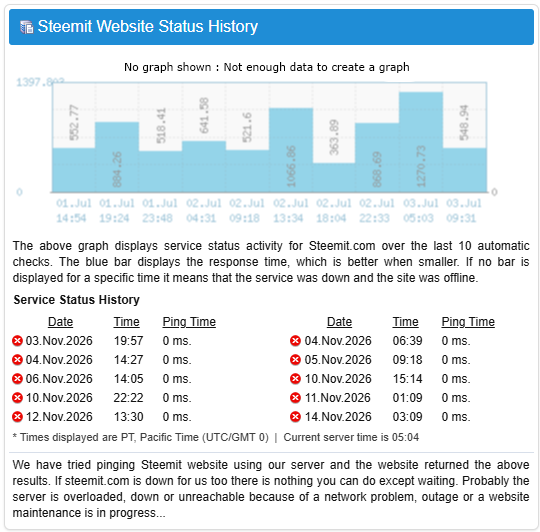
According to recent server ping logs from November 2026, automated monitoring tools recorded multiple consecutive failed connection attempts (0 ms. ping responses) across early and mid-November. Because the monitoring server could not establish a basic handshake with steemit.com, its automated system flagged the website as completely offline.
Is @Steemit.com Really Down? Full Server Report & Step-by-Step Solutions for Users
If you recently searched for Steemit’s server status, you may have come across an alarming red alert on popular monitoring websites like IsItDownRightNow. The report claims that Steemit.com is down for everyone, shows a 0 ms. response time, and even states that the platform has been unreachable for more than 1,690 days.
Here is the official update: Steemit is not offline. The Steem blockchain and the main Steemit web portal are live, secure, and operating normally.
According to recent monitoring logs captured in November 2026, automated status tools recorded ten consecutive failed ping checks between November 3, 2026, and November 14, 2026. Because the automated testing bot received zero response from the server during each check, its system generated a false "Down Forever" warning.
Why Automated Status Checkers Fail
• Security Firewalls Block Bots. Steemit uses enterprise-level DDoS protection and web application firewalls to block automated scraping and cyberattacks. These firewalls automatically drop incoming ping requests from third-party monitoring bots.
• Blacklisted Checker IPs. Over time, status-checking servers send thousands of automated requests to major websites. Security systems permanently block those specific server IPs, resulting in years of false 0 ms. downtime logs.
• Decentralized Architecture. Unlike traditional websites that rely on a single central server, Steemit runs on the decentralized Steem blockchain. Even if one web interface experiences a temporary hiccup, your posts, keys, and STEEM/SBD balances remain completely safe on the blockchain.
6 Proven Solutions If Steemit Won't Open for You
While Steemit is online globally, local internet issues or browser glitches can occasionally stop the page from loading on your device. If you cannot access Steemit.com, follow these six solutions in order:
Solution 1: Switch to a Public DNS (Fixes 80% of Loading Issues)
Your Internet Service Provider (ISP) may have outdated routing records for Steemit. Switching to a faster public DNS resolves this immediately.
• On Mobile (Android/iPhone): Go to your Wi-Fi or Network Settings, look for Private DNS (Android) or Configure DNS (iOS), and set it to 1.1.1.1 (Cloudflare) or dns.google (Google).
• On Windows/Mac: Open your Network Adapter settings, select IPv4, and enter 8.8.8.8 as your Preferred DNS and 1.1.1.1 as your Alternate DNS.
Solution 2: Clear Browser Cache and Cookies
Corrupted site data stored in your browser can cause endless loading loops or blank screens.
• Open your browser settings, go to Privacy and Security, and select Clear Browsing Data.
• Check Cached images and files and Cookies, then restart your browser and reload steemit.com.
• Quick Test: Open an Incognito / Private Window first. If Steemit loads there, clearing your cache will permanently fix the issue.
Solution 3: Use a VPN to Bypass Regional ISP Blocks
In certain regions, local telecom providers occasionally throttle or block specific crypto and Web3 domains.
• Turn on a trusted VPN app and connect to a server in Singapore, Germany, or the United States.
• Refresh the Steemit page. If it loads right away, the issue is with your local ISP's routing rather than Steemit's servers.
Solution 4: Switch Your API Node Inside Steemit
Sometimes the main website loads, but your feed, wallet, or comments fail to appear because a single RPC node is overloaded.
• Click on your Profile Picture in the top-right corner of Steemit and open Settings.
• Scroll down to the API Endpoint / Node dropdown menu.
• Select a different active Steem API node from the list and save your changes.
Solution 5: Access Your Account via Alternative Steem Frontends
Because Steemit is powered by the open Steem blockchain, you do not have to rely solely on steemit.com to publish blogs or manage your wallet.
• You can log in securely using your Steem Posting Key (or Steem Keychain) on alternative blockchain interfaces like Upvu, SteemPro, or Ecency/Steem mobile clients.
• All posts you publish on an alternative Steem frontend automatically appear on Steemit.com as well.
Solution 6: Check Real Community Activity Instead of Ping Tools
Before panicking over a red status banner, verify real-time activity directly:
• Visit the Steemit Trending or Hot feed to check the timestamps on the newest posts.
• Check official Steem community channels on Discord, or X (Twitter) for real-time announcements from witnesses and developers.
Thanks Friend, Reply & Comments!
nice post, i am also facing this types of problems?