• Sign in
  • Sign up 
  • Welcome
  • FAQ
  • Switch to Night Mode
  • Change Account Password 
  • Vote for Witnesses 
  • Steem Proposals 
  • Developer Portal 
  • Steem Bluepaper 
  • SMT Whitepaper 
  • Steem Whitepaper 
  • Privacy Policy
  • Terms of Service
Steemistry HomeSteemistry
LoginSign up

[Photoshop CC] Canvas Size

sapphire317 (33)in #photoshop • 8 years ago

Canvas Size

You can adjust your canvas in 'Canvas Size Box'.

[Image] → Canvas Size ( Alt + Ctrl + C)
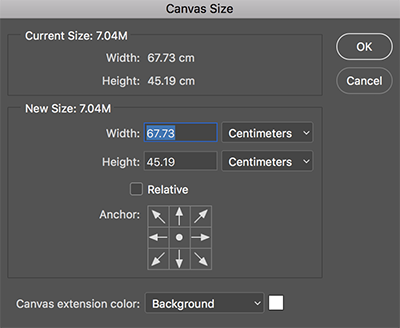
  1. Current Size : current canvas size

  2. New Size : set new canvas size

  3. Relative : not canvas size, but set the size of left, right, up, and down margin.

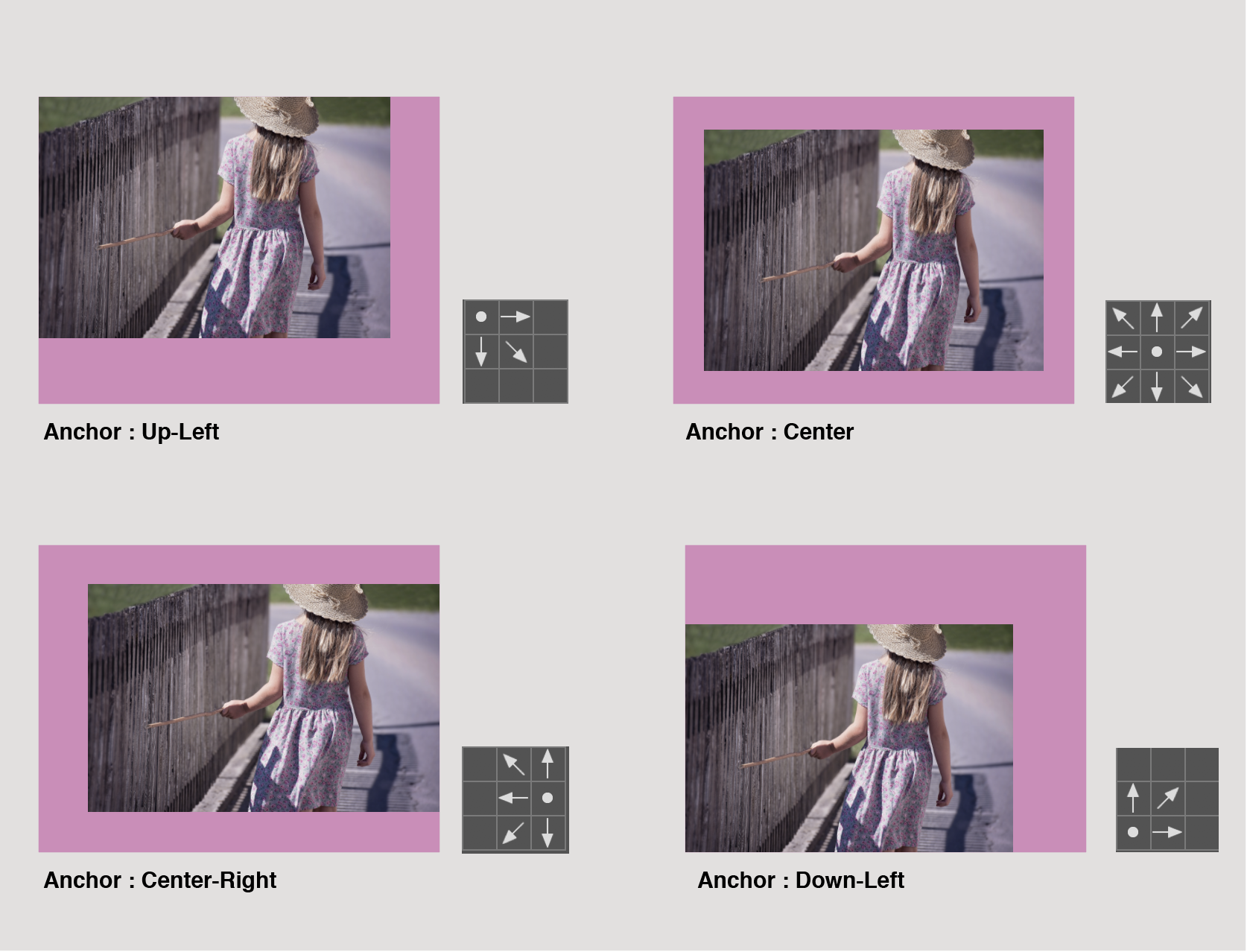
  4. Anchor : Specify the direction in which canvas extends.
#canvas #size #adjusting
8 years ago in #photoshop by sapphire317 (33)
$0.00
    2 votes
    • + sapphire317
    • + lec
    Reply 1
    Sort:  
  • Trending
    • Trending
    • Votes
    • Age
  • [-]
    a-0-0 (-9)(1)
     8 years ago 

    Upvote this blog post https://steemit.com/christianity/@bible.com/verse-of-the-day-hebrews-4-16-nlt

    $0.00
      Reply

      New to Steemistry?

      • Welcome Guide

      Promoted Posts

      • West Chester Wildlife: Photographs and observations of raptors in September 2026@remlaps
      • Reblog: A Working Prototype of Reblog with Comments@michelangelo3
      • The Diary Game | 21th, October 2026 | It was my nephew's birthday.@max-pro
      View all promoted posts

      Pinned Communities

      • CCC
      • Art & Artists
      • SCB Monkey Business
      • Tales & Stories
      • Steem for Betterlife
      • Trending Communities
      • SteemitCryptoAcademy
      • Newcomers' Community
      • আমার বাংলা ব্লগ
      • Steem Alliance
      • Steem POD Team
      • Korea • 한국 • KR • KO
      • Beauty of Creativity
      • AVLE 일상
      • Steem For Lifestyle
      • Tron Fan Club
      • STEEM CN/中文
      • Comunidad Latina