MeetAssist vs Interview Coder: Coding Interview Assistant Pricing and Features Compared
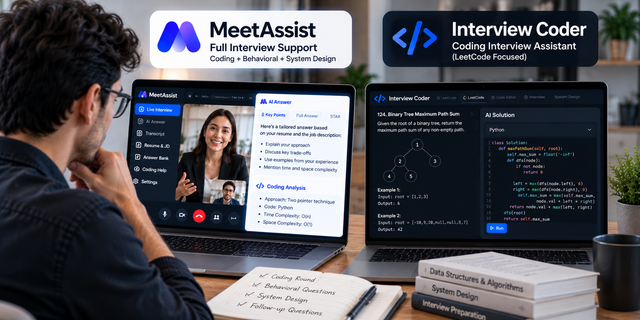
If you are preparing for a software engineering loop, you have probably come across Interview Coder. It made its name as a coding interview assistant built around LeetCode-style problems, and its own site still describes it as designed specifically for LeetCode interviews. The pitch is simple: a hard problem appears on screen, and help appears next to it.
The trouble is that a modern tech interview is rarely one coding problem. There is a recruiter screen, a behavioral round, a system design discussion, and often a few follow-up questions about your past projects. This article compares Interview Coder with the MeetAssist AI interview assistant across that whole loop, looking only at the help you get during the live interview. All prices and features come from each company's official website, checked in October 2026.
Quick Verdict
Interview Coder is a desktop app for Windows and Mac with a strong focus on coding rounds. Its AI features need a paid plan: $299 a month or $799 for lifetime access. MeetAssist covers coding too, with an Analyze feature that shows the approach, the code and the time complexity, but it is built for every round of the interview, including behavioral questions grounded in your resume and own stories. It costs $9 for 180 minutes or $29 for an unlimited month, with no subscription. For one month of interviews, MeetAssist is about ten times cheaper.
Coding-Only vs Every Round of the Interview
Interview Coder's roots are in coding. Its homepage title calls it an AI interview assistant for technical interviews, and its meta description says it is designed specifically for LeetCode interviews. Over time it has broadened. Its pricing now mentions support for all kinds of interviews, such as LeetCode and system design, and the site shows example use cases for behavioral, full stack, AI and ML, data analyst, product management and other roles. Even so, the product, its marketing and its pricing are still clearly centered on the coding round.
MeetAssist was built the other way around. It started from the full interview. It listens to both sides of the call, notices each question as it is asked, and shows an answer built on your resume and the job description. Coding is one part of that, handled by a dedicated screen-reading feature. Behavioral questions, technical follow-ups, system design, SQL and data questions, product and case interviews, online assessments, and salary questions are all covered in the same session.
Why does this matter? Because most candidates do not fail a loop on the coding round alone. They stumble on "tell me about a conflict with a teammate," or freeze when an interviewer asks them to walk through a project on their resume. A tool that only shines when code is on screen leaves those moments uncovered.
Solving Live Coding Tasks
Since coding is Interview Coder's strongest area, it is worth looking closely at how MeetAssist handles the same job.
MeetAssist's coding help lives in a feature called Analyze. During the call, you rest your mouse on Analyze, or press the keyboard shortcut in the desktop app, and it reads what is on your screen. That can be a problem on LeetCode, HackerRank or CoderPad, a multiple-choice question, or a diagram. For a coding task, it shows three things:
- The approach, so you understand the idea before you start typing and can explain it out loud.
- The code, in the language you set or the one it detects automatically.
- The complexity, so you are ready for the inevitable "what is the time and space complexity?"
A useful detail is that Analyze also takes into account what was said on the call. Interviewers often add a constraint out loud, like "assume the input does not fit in memory," that is not written on the screen. MeetAssist factors that in.
In the desktop app you can choose which display Analyze reads, which helps if you work with two monitors. For long problems that do not fit on one screen, you can add up to 10 screenshots. And under every answer there is a box for follow-ups, so you can ask "why does this work?" or "can you do it in constant space?" without starting over. That matters, because interviewers rarely stop at the first working solution.
Interview Coder says it uses screen reading and, in its newer version, audio support for real-time guidance. Its pricing page describes its AI as "most powerful fine tuned AI models" without naming them. MeetAssist is specific here: paid plans unlock the latest Gemini, GPT and Claude models.
Behavioral and System Design Rounds
This is where the difference between the two tools is easiest to feel.
For behavioral questions, MeetAssist builds answers on three sources you provide: your resume, the job description, and your Answer Bank. The Answer Bank is where you keep your real stories and prepared answers. You can upload them as a PDF, Word or text file, or type them in. When the interviewer asks "tell me about a time you handled a production incident," MeetAssist uses your actual incident, not a made-up one. You can turn on the STAR method so answers follow Situation, Task, Action and Result, and choose whether you want key points, bullets or a full answer.
Follow-ups are handled as part of the same conversation. MeetAssist remembers what has been said, so when the interviewer asks "what would you do differently?", the answer connects to the story you just told.
For system design, MeetAssist offers talking points you can build on, and Analyze can read a diagram on your screen. That helps you structure a discussion around scale, storage, and trade-offs instead of jumping straight into components.
Interview Coder lists behavioral and system design among its use cases, but its site does not describe resume grounding, a place for your prepared stories, or answer formatting options like STAR. If those rounds matter in your loop, try them in its app before committing to a plan.
Pricing: $299/Month or $799 Lifetime vs $9 for 180 Minutes
Here are the prices listed on each company's official website in October 2026.
|
Plan |
Price |
What you get |
|
Interview Coder Free Download |
$0 |
Download and explore the app; AI features need a subscription |
|
Interview Coder Monthly Pro |
$299 a month |
1,000 usage credits per month, audio support, all interview types |
|
Interview Coder Lifetime Pro |
$799 one-time |
Unlimited lifetime access |
|
MeetAssist Free Trial |
$0 |
20 minutes with all features, including Analyze, no card |
|
MeetAssist 180 Minutes |
$9 one-time |
180 minutes that never expire |
|
MeetAssist Unlimited Week |
$19 one-time |
Unlimited minutes for 7 days |
|
MeetAssist Unlimited Month |
$29 one-time |
Unlimited minutes for 30 days |
What a Typical Search Costs
|
Your situation |
Interview Coder |
MeetAssist |
|
A single onsite loop of three rounds |
$299 (one month) |
$9 (180 minutes) |
|
One busy month of interviews |
$299 |
$29 |
|
Three months of searching |
$799 lifetime (cheaper than three months at $299) |
$87 (three unlimited months) |
For a month of interviews, MeetAssist costs about ten times less than Interview Coder's monthly plan. Interview Coder's lifetime option at $799 is the better deal on its side if you plan to use it for years, but that same $799 would cover more than two years of MeetAssist's unlimited months bought one at a time. Most job searches end long before that.
There is also the question of trying before you pay. Interview Coder's FAQ says you can download and explore the app for free, but the AI features require a subscription. MeetAssist gives every new account 20 free minutes with all features, so you can run Analyze on a real LeetCode problem before spending anything. If it does not work for you, MeetAssist offers a full refund, or a refund within 7 days if no interviews were processed. Nothing renews automatically.
Platform Support
Both tools cover the main coding platforms and video call apps.
Interview Coder is a desktop app for Windows and Mac. Its site lists Microsoft Teams, Zoom, Google Meet, Amazon Chime, Cisco Webex, Lark, HackerRank, CoderPad and Codility among the platforms it is tested against.
MeetAssist offers three ways to use it:
- Desktop app for Windows 10 and 11 and macOS 13 or later. It listens to your microphone and your computer's sound, so it works with any call app, including Zoom, Google Meet, Microsoft Teams, Webex and Slack, and with coding platforms like HackerRank, CoderPad and LeetCode. It stays hidden during screen sharing and recordings, which matters in coding rounds where you share your editor.
- Chrome extension for meetings opened in Chrome, on Windows, Mac or Linux. Analyze reads the current tab. Note that the extension is visible if you share that tab or your whole screen, so the desktop app is the better pick for screen-shared coding rounds.
- Phone Mode, where you scan a QR code and read the answers and code on your phone's browser, on iPhone or Android, with no app to install. That keeps your computer screen clean while you type.
MeetAssist also runs on its own servers in the US, Europe and India, and routes each session to the nearest region. It publishes median server response times of 35 ms in the US, 37 ms in Europe and 69 ms in India. If you interview from outside North America, that regional setup is worth noting.
Table
|
Feature |
Interview Coder |
MeetAssist |
|
Main focus |
Technical and LeetCode interviews |
Every round of a live interview |
|
Coding help from the screen |
Yes |
Yes, approach, code and complexity |
|
Uses what was said on the call |
Audio support in newer version |
Yes, Analyze includes call context |
|
Long problems |
Not specified |
Up to 10 screenshots |
|
Resume and job description context |
Not described on its site |
Yes |
|
Prepared stories |
Not described |
Answer Bank |
|
STAR answers |
Not described |
Yes |
|
AI models |
Fine tuned models, not named |
Latest Gemini, GPT and Claude on paid plans |
|
Coding platforms |
HackerRank, CoderPad, Codility, others |
LeetCode, HackerRank, CoderPad, others |
|
Ways to use it |
Windows and Mac desktop app |
Windows and Mac app, Chrome extension, Phone Mode |
|
Free AI use |
No, subscription required |
20 minutes, no card |
|
One month of use |
$299 |
$29, or $9 for 180 minutes |
Which Is Right for Your Loop
Interview Coder may fit if your process is almost entirely coding rounds, you plan to interview over a long period, and you are ready to buy the $799 lifetime plan rather than pay monthly. Its platform list is broad, and it has been focused on coding for a long time.
MeetAssist fits better if your loop looks like most loops do: a recruiter screen, one or two coding rounds, a behavioral round, and maybe system design. It handles coding with Analyze, and it also handles the rounds where answers need to come from your own experience. It works across the desktop app, a Chrome extension and your phone, and it costs a fraction of a monthly subscription. If you have a single onsite coming up, $9 is likely enough to cover it.
A good way to decide is to use MeetAssist's free 20 minutes on a practice call. Put a LeetCode medium on screen, ask for the approach and the complexity, then switch to a behavioral question about a real project on your resume. You will see quickly whether one tool can carry the whole interview for you.
One rule applies to every tool in this space. Some employers, schools and assessment platforms do not allow AI help during interviews or tests. Check the rules before your call and follow them.
Frequently Asked Questions
How much does Interview Coder cost compared to MeetAssist?
Interview Coder costs $299 a month or $799 for lifetime access, and its AI features need a paid plan. MeetAssist costs $9 for 180 minutes, $19 for an unlimited week or $29 for an unlimited month, all as one-time payments.
Can MeetAssist solve coding interview problems?
Yes. Its Analyze feature reads a problem on LeetCode, HackerRank or CoderPad from your screen and shows the approach, the code and the time complexity. It also takes into account what the interviewer said on the call.
Does Interview Coder help with behavioral interviews?
Its site lists behavioral interviews among its use cases, but it does not describe resume grounding, a place for prepared stories, or STAR formatting. MeetAssist offers all three.
Is there a free version of Interview Coder?
You can download and explore the app for free, but its FAQ says a subscription is required to use the AI features. MeetAssist gives 20 free minutes with all features, including coding help.
Which coding interview assistant works with HackerRank and CoderPad?
Both do. MeetAssist's desktop app works alongside HackerRank, CoderPad and LeetCode, and stays hidden when you share your screen.
I liked how you highlighted that Interview Coder focuses mainly on LeetCode-style problems while MeetAssist covers the whole interview loop, including recruiter and system‑design stages—great insight for candidates juggling multiple formats! Have you tried using MeetAssist’s behavioral‑question prompts during mock interviews? 🚀💡👍